Hello, this is my first post
Why I started this blog, what I’ll write about, and a short look at how it’s built.
Hi, I’m Igor
This is the first post on my blog, so hello.
I’ve been building software for more than ten years. I build a lot of things, at work and on the side, and then I forget how I did them. Not the code, Git remembers that. The reasons: the decisions, the dead ends, the small fixes that saved a day. Most of that never got written down.
So I’m writing it down here, where it might help someone else too.
What to expect
Practical notes from real work. When I run into a problem, I’ll write up what happened, what I tried, and what I’d do differently. If you’re dealing with the same problem, I hope it saves you some time.
Topics will include:
- backend and database decisions,
- moving production data safely,
- building software with AI agents,
- and the occasional side project.
Now and then I’ll go deep on a single topic: how a tool works under the hood, and how we use it at work.
I’ll aim for one post a week. It’s not a hard rule. Some weeks the code wins.
How this blog is built
The first topic is the blog itself, kept short. It’s a weekend project, so the stack is small:
| Piece | Its job |
|---|---|
| Laravel and Livewire | Pages, search and comments, rendered on the server |
| SQLite | One file for everything, with no database server to run |
| Plain HTML and CSS | Fast pages and no build step |
Small doesn’t mean limited. SQLite handles most low to medium traffic websites without trouble, which covers this blog with plenty of room to spare. Laravel and Livewire take care of everything else, from search to comment moderation. If the blog ever outgrows this setup, that’s a good problem to have.
It runs on a small Hetzner server managed with Laravel Forge, which keeps the hosting bill low. Anything that takes a while, like building a PDF, runs on a queue worker, so nobody waits for it. Forge and queues both come from Laravel’s own toolbox, ready to use ❤️
The server is backed up every day, so if anything goes wrong, I can restore the whole thing: articles, comments and all.
I built most of it with AI agents. My routine looks like this:
- Sketch the idea on paper, in Notion, or in any scratchpad.
- Explain it to the agent, often by voice, with any context that helps (like that scratchpad).
- The agent proposes a plan, and we adjust it.
- The agent builds it. I get coffee.
- I read the whole diff and ask for fixes.
- A second agent looks for edge cases I missed.
- The code quality checks and tests pass (static analysis, formatting, the full suite), and it ships.
Bigger changes often ship behind a feature flag. The code goes to production switched off, and I turn it on when I’m ready, usually for myself first and then for everyone. That makes deploying and releasing two separate steps. If something looks wrong in production, I switch the feature off in seconds: no rollback, no redeploy, and nobody waiting on a hotfix.
Publishing without a deploy
Posts don’t need a code release. I write the text, and an agent formats it, uploads the images and publishes it through a private MCP connection (a standard way for AI tools to talk to an app).
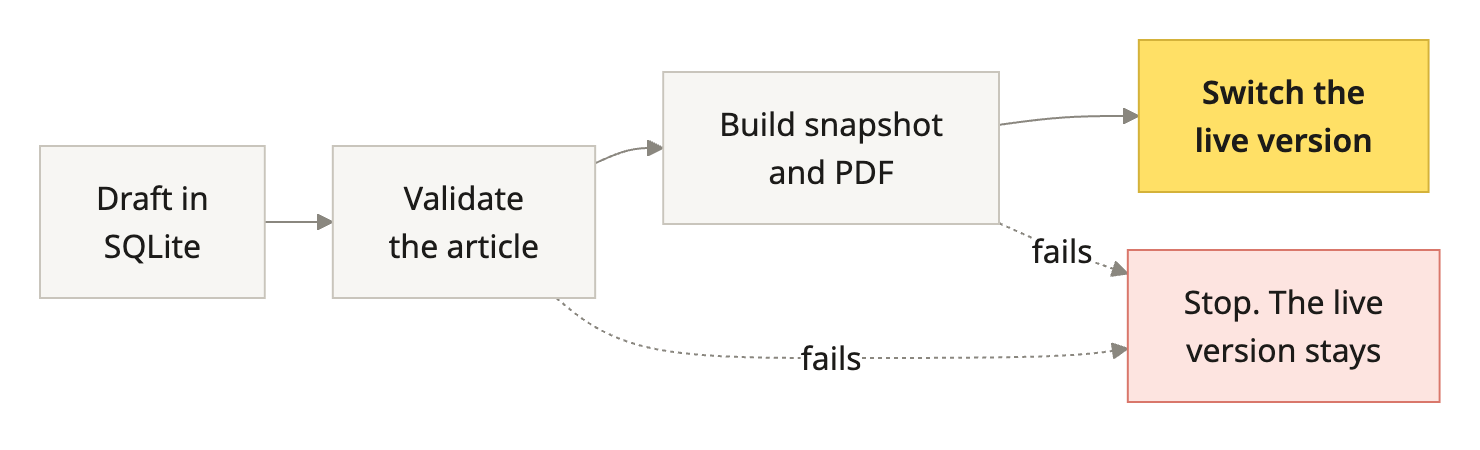
That last part is my favourite. A broken build never reaches readers.
Say hi
If something here helps, or you’d do it differently, tell me in the comments. They appear once I’ve read them. You can also follow the RSS feed to catch next week’s post, give or take a week.
Comments
Questions, a different approach, or a correction? I’d like to hear it. Comments appear here after I’ve read them.
You’re offline. Your comment is still here; reconnect before submitting.